
Many Android users see MagSafe accessories for sale and wonder if they can use them with their phones. The short answer is yes, in many cases, but there are a few things you should know before buying a charger, wallet, or car mount.
This guide explains how MagSafe works with Android devices, what accessories are compatible, and how to fix common issues at home.
What Is MagSafe?
MagSafe is Apple’s magnetic attachment system introduced with the iPhone 12 series. It uses a ring of magnets built into the phone to align wireless chargers and accessories.
MagSafe accessories include:
- Wireless chargers
- Car mounts
- Wallet attachments
- Battery packs
- Phone stands
While MagSafe was designed for iPhones, many Android devices can use similar accessories with the right setup.
Can Android Phones Use MagSafe Accessories?
Yes, most Android phones can use MagSafe-style accessories.
However, Android phones typically do not include the same magnetic ring built into the device. Because of this, you may need:
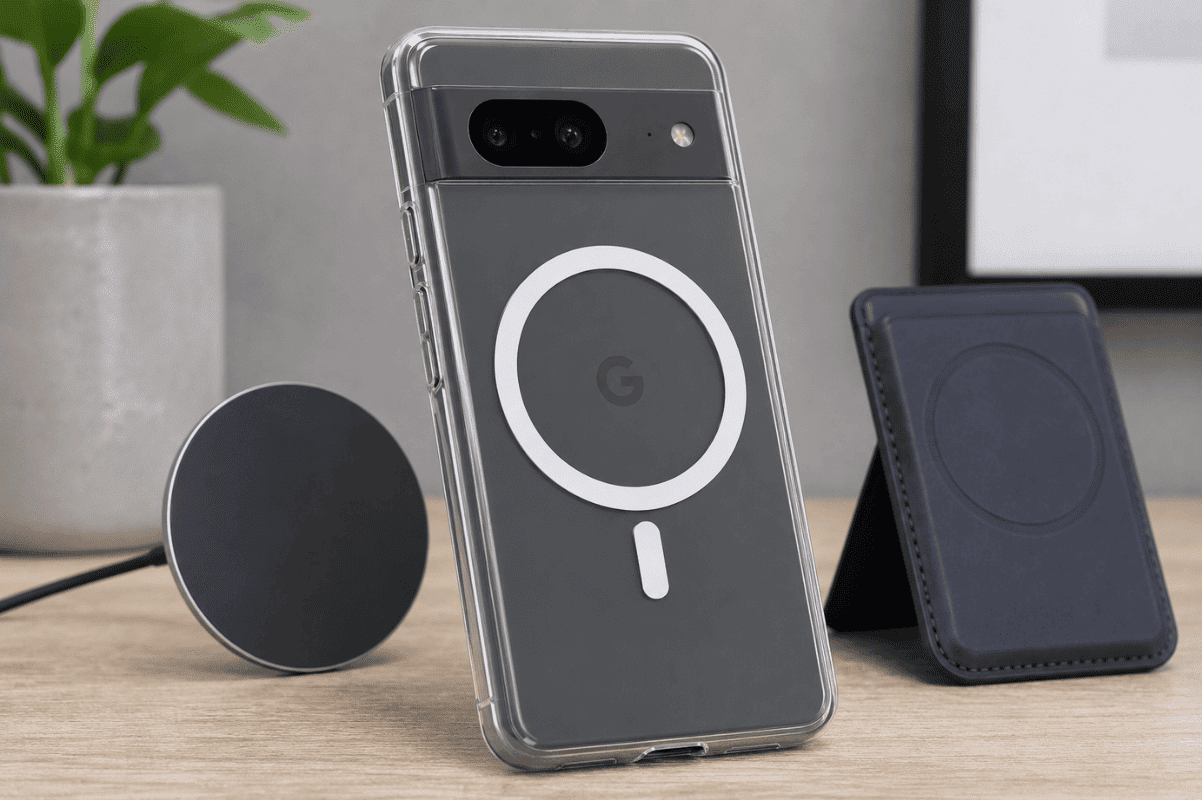
- A magnetic phone case
- A MagSafe-compatible case
- An adhesive magnetic ring
Once installed, many MagSafe accessories can attach and function normally.
Does MagSafe Charging Work on Android?
In most cases, yes.
MagSafe chargers use standard Qi wireless charging technology. Since many Android phones support Qi charging, they can charge on a MagSafe charger.
However, there are some limitations:
- Charging speeds may be slower than on iPhones.
- Magnetic alignment may not be perfect.
- Some Android models may generate extra heat during wireless charging.
Check your phone manufacturer’s specifications to confirm Qi wireless charging support.
How to Make MagSafe Work Better with Android
If your Android phone does not have built-in magnetic alignment, try these simple solutions:
Use a MagSafe-Compatible Case
Many manufacturers sell cases specifically designed for Android phones with built-in magnetic rings.
This is usually the easiest and safest option.
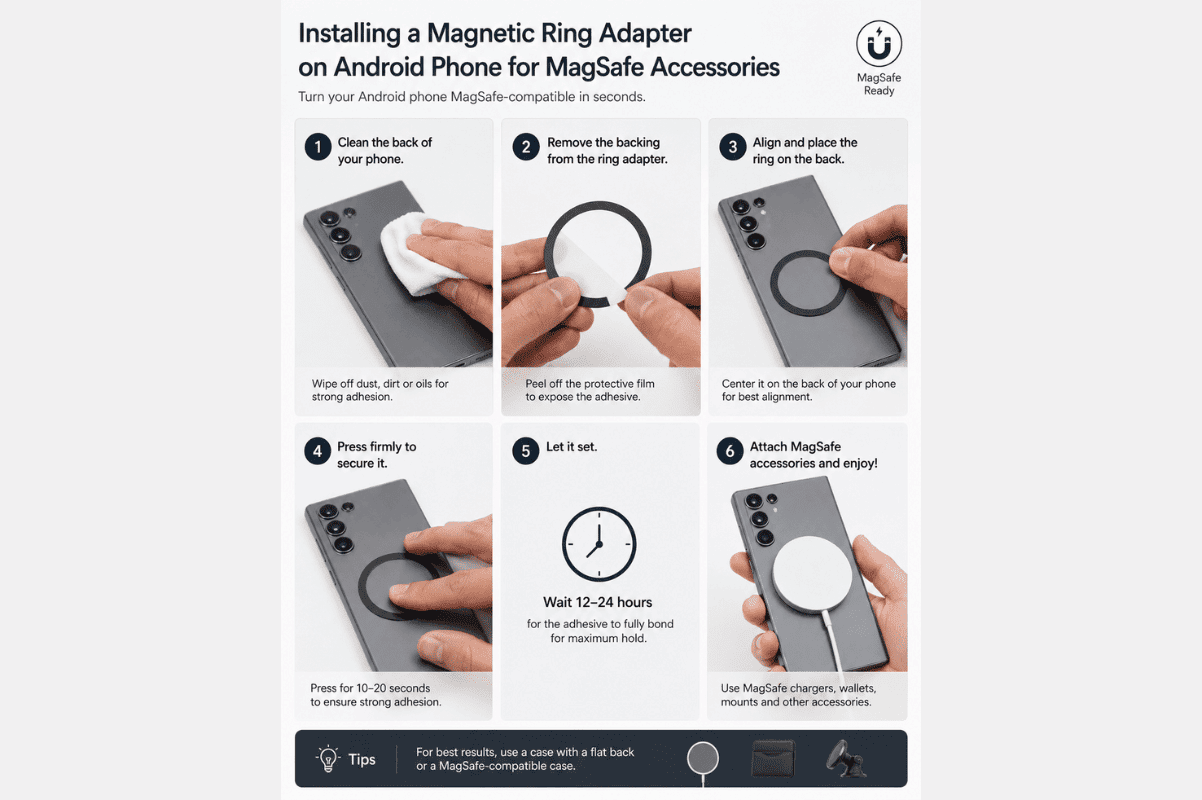
Install a Magnetic Ring Adapter
Magnetic ring adapters stick to the back of your phone or case.
Before applying:
- Clean the surface thoroughly.
- Use the alignment guide included with the adapter.
- Allow the adhesive to fully set before attaching accessories.
Proper placement improves charging performance and accessory stability.
Remove Thick Cases
Very thick cases can weaken the magnetic connection and reduce charging efficiency.
If your charger disconnects frequently, remove the case and test again.
Common Problems and DIY Fixes
Charger Connects but Charges Slowly
Try these steps:
- Use the original charging adapter.
- Check for debris on the charging surface.
- Reposition the phone for better alignment.
- Remove thick or metal cases.
Accessories Keep Falling Off
This usually means the magnetic connection is weak.
Try:
- Installing a stronger magnetic ring.
- Using a MagSafe-compatible case.
- Replacing worn adhesive rings.
Phone Gets Hot While Charging
Wireless charging naturally creates some heat.
To reduce temperatures:
- Remove the phone case temporarily.
- Charge in a cool room.
- Avoid gaming or streaming while charging.
If overheating continues, stop using the charger until the issue is identified.
When DIY Fixes Are Not Enough
If wireless charging suddenly stops working entirely, the issue may be more serious than accessory compatibility.
Possible causes include:
- Damaged wireless charging coil
- Charging circuit failure
- Internal board damage after a drop
- Liquid exposure
At that point, professional inspection is recommended. A qualified cell phone repair technician can test the charging system and identify whether the problem is accessory-related or caused by internal hardware damage.
Should Android Users Buy MagSafe Accessories?
For many Android users, the answer is yes.
MagSafe-style accessories provide convenient mounting, charging, and storage options. With a compatible case or magnetic ring adapter, most Android devices can take advantage of the ecosystem without major modifications.
Start with simple troubleshooting steps at home before replacing accessories or assuming your phone is defective. If wireless charging or magnetic accessories still do not function properly, visiting a Phone repair Mississauga technician can help determine whether a hardware issue is preventing normal operation.
MagSafe can work surprisingly well with Android phones, especially when paired with a compatible case or magnetic ring. Most charging and attachment problems can be resolved through simple adjustments at home.
If you’ve tried the fixes above and your device still has charging issues, a professional inspection can help identify underlying hardware problems and prevent further damage.